
Registration and revenue operations
Event Registration and Ticketing Software
Create registration forms, sell tickets, send confirmations and see who has paid—all from one place.
Registration, payments and revenue
A registration journey that stays connected after checkout
Build free, paid and invitation-only pathways for Saudi conferences, workshops, memberships, sponsors and donors. Orders, invoices, attendee answers and check-in eligibility remain connected to the same CRM record. Saudi deployments can use Moyasar and Tap, with local support from Dryfta Software Company.

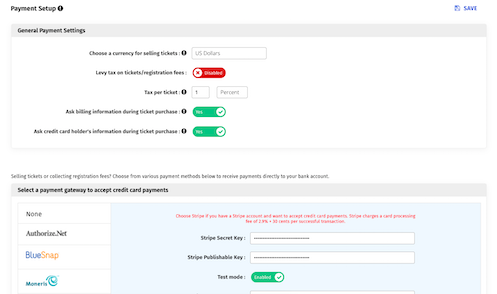
Global gateway library shown on the sister site; Saudi online payments use Moyasar and Tap











Create every ticket and package your event needs
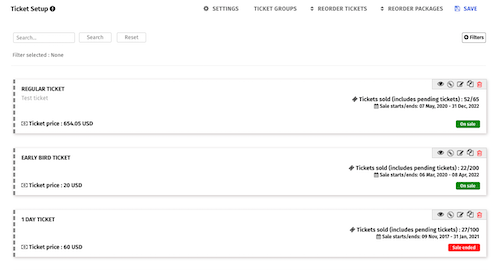
Use one catalogue for attendee tickets, annual memberships, workshops, sponsorship packages, donations and optional add-ons.
- Set independent sale dates, prices, quantities and access rules for every ticket type.
- Show tickets together, place them on separate pages or organise them into clear sections.
- Assign the correct participant role automatically after purchase.
- Offer add-ons such as parking, gala access or extra workshop places in the same order.
Collect fees through the methods your organisation approves
Support online and offline payment journeys without losing the order history or the participant record.
- Work with more than 140 currencies on the global platform; configure the currencies relevant to the Saudi event.
- Use Moyasar and Tap for Saudi online payments, with bank transfer, purchase order or venue payment where the organiser permits.
- Apply VAT where required and keep the tax treatment visible on order documents.
- Dryfta does not hold ticket revenue or take a percentage of the transaction value.
Ask the right registration questions
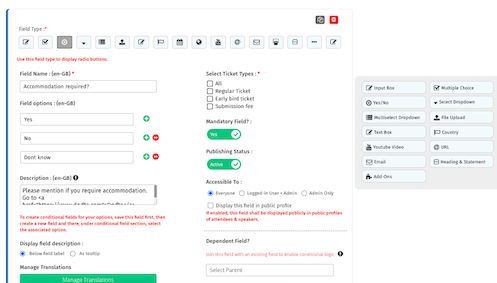
Collect operational, accessibility and consent information through forms that change with the selected ticket.
- Add an unlimited number of questions using up to 15 field types.
- Show a question to every registrant or only to purchasers of a specific ticket.
- Use dropdowns, multiple choice, multi-select, yes/no, long text and file uploads.
- Build multi-level conditional logic for a shorter, more relevant form.
Publish on Dryfta or embed registration elsewhere
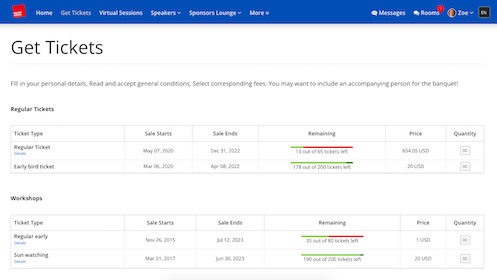
Give each offer a focused purchase page, or place the form inside an approved external event website.
- Create standalone pages for tickets, sponsorship packages and donations.
- Let signed-in participants fill known information automatically.
- Allow several ticket types in one order and add supporting text, images or video.
Manage orders, invoices and purchase orders from one desk
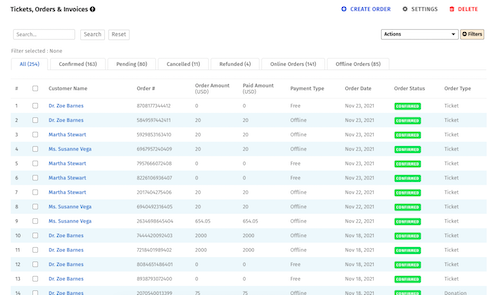
Give finance and registration teams a shared operational view without maintaining a separate spreadsheet.
- Review payment, billing and ticket details for every order.
- Update offline payments, reassign tickets and customise invoices and receipts.
- Create invoice-first offline orders or place an online order on behalf of a participant.
- Export current orders and ticket records to CSV.
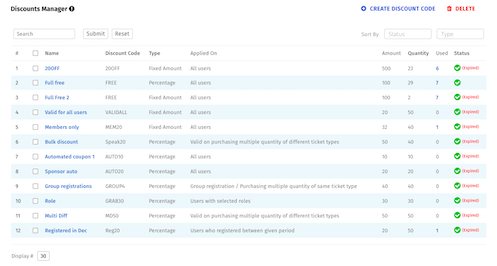
Use discounts and communication to improve conversion
Support timely, targeted promotion while keeping eligibility rules under organiser control.
- Create percentage or fixed-value discount codes, including limited-quantity offers.
- Target reminders and campaigns using registration and CRM data.
- Invite successful purchasers to share the event or recommend it to a colleague.
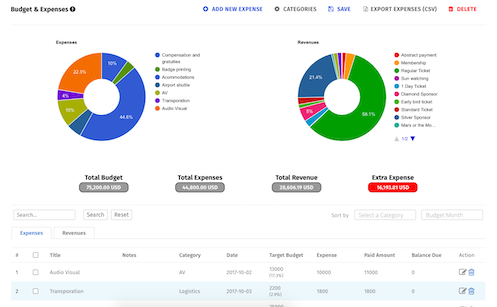
See expenses and revenue together
Track the event budget alongside the revenue already recorded through ticket and donation orders.
- Record expenses by category, target budget and paid amount.
- Update ticket and donation revenue automatically.
- Review visual summaries of budget, profit and unpaid expenses.
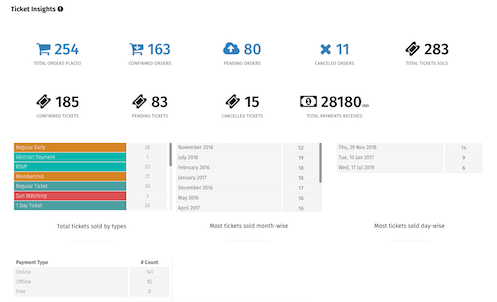
Follow ticket performance in real time
Give organisers a current view of which tickets and payment methods participants are choosing.
- Identify top-selling ticket types and preferred payment methods.
- Monitor ticket revenue as orders are confirmed.
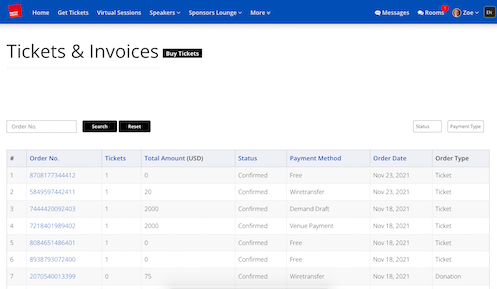
Give registrants a self-service order dashboard
Let participants resolve routine tasks themselves while the organising team retains a complete record.
- Review purchases and resume payment for a pending order.
- Update profile information and upload a profile image.
- Download or email invoices and receipts.
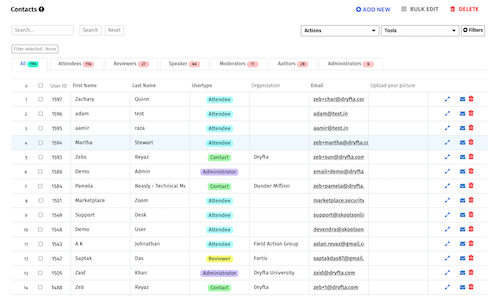
Connect every registrant with the event CRM
Use the same record for answers, tickets, notifications, profile completion and arrival.
- Filter incomplete profiles and send focused reminders.
- Send operational updates, manage guest check-in and export attendee data.
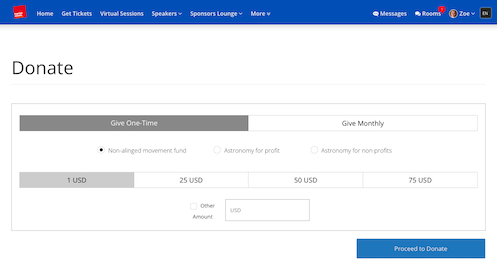
Accept one-time or recurring donations
Support fundraising conferences with donation choices that remain visible in the donor and finance records.
- Offer preset amounts, a custom amount and recurring monthly giving.
- Let donors choose a cause and pay through an approved method.
More ways to support your event
Everything your team can manage in one place
Eligibility and access
- Set membership validity, sell workshop tickets and permit check-in only for eligible purchasers.
- Use ticket or participant roles to protect premium content.
- Charge a submission fee before an author can complete an abstract submission.
Discount and order controls
- Set expiry, participant-group, form-answer, country, per-user and per-ticket conditions.
- Apply an eligible discount automatically and auto-confirm approved offline payment routes.
- Notify the lead administrator when payment configuration changes.
Documents and follow-up
- Generate and email invoices automatically after an order.
- Add social-sharing and refer-a-colleague prompts after a successful purchase.
- Export the exact order, ticket and attendee data the operations team needs.
Customer success story
Johns Hopkins University: ICFP 2022
Johns Hopkins CCP used Dryfta to bring together more than 3,800 registrations, 2,900 abstract submissions and over 350 sessions for a large hybrid conference.
Read the case studies
What customers value
Why teams choose Dryfta
See what academic and professional teams find most useful about the platform.

Peter Raeves
European Tissue Repair Society
Peter highlights the platform’s stability and the breadth of tools available for running a complete event.

Tamye Riggs
Association Typographique Internationale
Tamye values the platform’s depth and the time and cost benefits available once a team learns the workflow.

Ian Giles
The University of Edinburgh
Ian describes Dryfta as a good fit for academic and commercial conferences that need one connected process.

Alan Whiteside
NHS Highland
Alan focuses on the professional participant experience and the positive engagement it supported.
Related guides and articles
Continue planning with practical resources




Frequently asked questions
Practical answers before you begin
Can a Saudi event use Moyasar or Tap?
Yes. Dryfta KSA plans and configures Saudi online payment journeys around Moyasar and Tap, alongside organiser-approved offline methods. Final gateway availability and commercial terms are confirmed during implementation.
Can one form support several attendee types?
Yes. Ticket-specific questions, roles, conditional fields and access rules let one event support attendees, authors, speakers, members, sponsors and invited guests without giving everyone the same form.
Does Dryfta charge a percentage of ticket revenue?
Dryfta does not hold ticket revenue or take a percentage of the transaction value. Payment-gateway and banking charges remain subject to the selected provider.
Full feature list
What you can do with this product
Explore the complete feature list for this product and see how each tool supports your team’s work.
Event registration
Build flexible registration pathways for attendees, authors, reviewers, speakers and invited guests.
- Multiple configurable forms for different user types and registration pathways
- Attendee, reviewer, review and abstract-submission forms
- Embeddable forms and language-localised registration experiences
- Instructional text, privacy notices, consent questions and reCAPTCHA
- Automatic merging of registration data into the event CRM
- Optional public attendee profiles
- Open, invitation-only and wait-list registration
- Pre-filled forms for known contacts and logged-in users
- Automated registration notifications and organiser updates
- Field-level visibility and add, edit and delete permissions
- Required-field validation and configurable file uploads including audio and video
- Ticket-specific fields, role-based ticket access and attendee autofill
Ticketing and online payments
Sell registrations, workshops, memberships, sponsorships and add-ons using organiser-controlled payment workflows.
- Paid and free ticket types with custom registration questions
- Workshop tickets with eligibility-aware onsite check-in
- Event memberships, premium-content access and validity periods
- One-time and recurring donations
- Sponsorship packages and additional purchasable items
- Online and offline payment methods controlled by the organiser
- Automatic invoices, confirmations and order-management controls
- Cart-abandonment notifications for registrants and administrators
- Discount codes by ticket, user, group, country, conditions and expiry date
- Automatic or manually entered conditional discounts
- Supported global gateways include Stripe, Dryfta Payments, Authorize.net, 2Checkout, Square, CyberSource, Moneris, iPay and PayTM
- Saudi payment support planned through Moyasar and Tap
See how this would work for your event
Book a practical demo with the local Dryfta KSA team.
Dryfta products
Choose the tools your event needs
Each product works with the same people, programme, payment and engagement records.
Abstract Submission and Peer Review Software
Collect abstracts, assign reviewers, record decisions and keep authors updated without juggling spreadsheets.
View productProgramme Scheduling and Speaker Management
Build your agenda, assign rooms and speakers, spot clashes and publish schedule changes quickly.
View productMembership Management Software
Manage plans, member records, benefits, protected content, event discounts, private sessions and renewal status in the same platform used for your events.
View product